• Home
  • Game
    Action Simulation RPG Sports Casual Cards Music Puzzle Shooting Romance
  • Apps
    Business Social Lifestyle Shopping Tools Travel Finance Education News Health
  • Blogs

English 中文(简体) 中文(繁体) 한국어 日本語 Português Español Русский العربية Indonesia Deutsch Français ภาษาไทย
Home Apps Education AutoCAD 2010 Beginner Tutorial
AutoCAD 2010 Beginner Tutorial

AutoCAD 2010 Beginner Tutorial

1
2
3
4
5
Download
  • Version 3.0
  • Category Education
  • Package Name com.songsak.cadtrianning.AutoCAD2010BeginnerTutorial
  • Update Time December 23, 2024
  • Size 28.63MB
About this app

AutoCAD 2010 Beginner Tutorial

AutoCAD 2010 Beginner Tutorial

Welcome to the

Learning AutoCAD 2010 and AutoCAD LT 2010

Although this guide is designed for instructor-led courses, you can also use it for self-paced learning.

The guide encourages self-learning through the use of the AutoCAD or AutoCAD LT Help system.

This introduction covers the following topics:

Course objectives

Prerequisites

Using this guide

Default installation

n

CD contents

Completing the exercises

Settings for the exercises

Imperial and metric datasets

Notes, tips, and warnings

Feedback

This guide is complementary to the software documentation. For detailed explanations of features and

functionality, refer to the Help in the software.

Course Objectives

After completing this course, you will be able to:

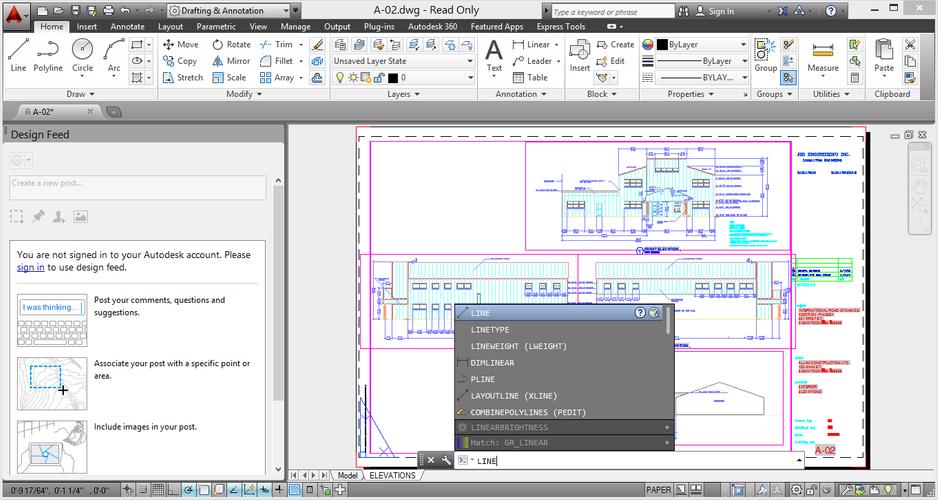
Navigate the interface, open and close files, and use the Zoom commands to adjust the display of

objects on the screen.

Describe units, function keys, and coordinate systems and create basic objects, using different data

input techniques, object snaps, object snap tracking, polar tracking, and PolarSnap.

Select, modify, and adjust the properties of objects using object grips and the Move, Copy, Rotate,

Mirror, and Array commands.

Create and manage layers and linetypes and obtain geometric information from objects in the

drawing.

Modify objects by changing their size, shape, orientation, or geometric composition using Trim,

Extend, Offset, Join, and other commands.

Create layouts, and create and manipulate viewports on the layouts.

Create and edit annotation objects using multiline and single line text.

Create, edit, and manage dimensions and dimension styles

What's New in the Latest Version 3.0

Last updated on Aug 24, 2015 bug fix
Download(28.63MB)
Users also viewed
  • Prabhu Sharnam

    Prabhu Sharnam

    4.1 June 25, 2026
  • Spelling Test Champion

    Spelling Test Champion

    1.0 June 22, 2026
  • Trackunit Virtual Hardware

    Trackunit Virtual Hardware

    1.5 June 22, 2026
  • TMDB Trademark Check

    TMDB Trademark Check

    1.1 June 21, 2026
  • YOR Office

    YOR Office

    2.19 June 21, 2026
  • Consultant Buddy: Party Calc

    Consultant Buddy: Party Calc

    2.1 June 20, 2026
  • Bulldozair

    Bulldozair

    3.74.0 June 18, 2026
  • Forever Scandinavia

    Forever Scandinavia

    21.4 June 18, 2026
  • Letter Writing Samples

    Letter Writing Samples

    1.2 June 18, 2026
  • Agronomy Tool

    Agronomy Tool

    1.5.2 June 17, 2026
  • Cargo.LT

    Cargo.LT

    4.0.7 June 17, 2026
  • Internal Organs in 3D Anatomy

    Internal Organs in 3D Anatomy

    3.1 June 17, 2026
  • Autoshkolla

    Autoshkolla

    2.0.4 June 17, 2026
  • Nusoft Mail

    Nusoft Mail

    4.5 June 16, 2026
  • KW MOCI

    KW MOCI

    3.1.4 June 16, 2026
About Privacy Policy Terms of Service Cooking Policy

© Copyright 2017-2026 downzk.com