

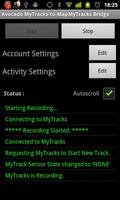
Make Google's "My Tracks" live with the Avocado MyTracks-to-MapMyTracks Bridge.
It allows you to do live tracking of sports activities by extracting data from the ever popular My Tracks app and making it appear on MapMyTracks.com.
You will get live data from whatever sensors e.g. heart rate you have connected to My Tracks including the SRM Power Control 7 which we used for tracking the 2012 Tour Down Under Bicycle Race as described at http://blog.urremote.com/2012/02/adventures-tracking-bicycle-racing-why.html .
How to setup the application:
1. You need to have My Tracks installed.
2. Sharing and access to third-party applications needs to be enabled in MyTracks. You’ll find the setting in Menu-> More-> Settings -> Sharing -> Allow access. This allows the bridge application to control MyTracks (turn recording on and off) and retrieve sensor information (e.g. heart-rate data) from MyTracks.
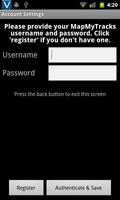
3. When first run, the bridge application will ask you for your MapMyTracks username and password.
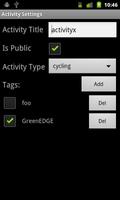
4. You can also add activity details.
a. The title is the name you give to the activity. It must be unique which is achieved by adding a time stamp.
b. Public or private. Public allows everyone to see the activity details. Private activities are only available to you.
c. Select the activity type from the list.
d. Add any tags you may wish. The tags group activities and make them easier to find. You can place tags for the event you are in, the team you are in, etc. Activities are grouped by tag in hubs on MapMyTracks. Tags can optionally be date stamped so that multi day activities can be grouped by day.
When you begin your activity:
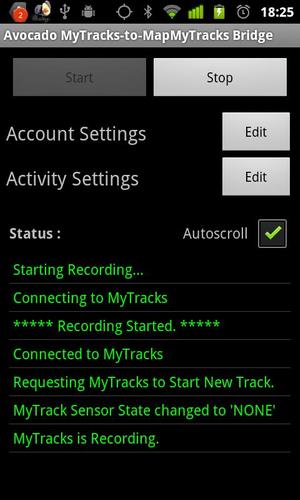
Press the start button.
It will not start recording until it gets a GPS fix usually under 15 secs with a good view of the sky. It is live online when you see “Uploaded XX:XX:XX” with timestamps coming up on the “updates” portion of the screen. The web page is about 5-15 seconds behind your activity. It is designed to be in the background. Switch back to My Tracks to see your map and data as you undertake the activity.
At the end of your activity:
1. Go to the bridge application and press the stop button.
2. You can view the offline details of the activity in MyTracks.
The application responds to intents allowing remote starting/pausing/resuming/stopping. Intents are com.urremote.bridge.intent.* where * is START, PAUSE or STOP. We used this with the Tasker application in the Tour Down Under to trigger the application at scheduled race starts and to remote control the application by SMS.
More information at blog.urremote.com/2011/11/is-live-bicycle-tracking-going-to-have.html.







 Download