• Home
  • Game
    Action Simulation RPG Sports Casual Cards Music Puzzle Shooting Romance
  • Apps
    Business Social Lifestyle Shopping Tools Travel Finance Education News Health
  • Blogs

English 中文(简体) 中文(繁体) 한국어 日本語 Português Español Русский العربية Indonesia Deutsch Français ภาษาไทย
Home Apps Tools Capture Clipper
Capture Clipper

Capture Clipper

1
2
3
4
5
Download
  • Version 6.6.0
  • Category Tools
  • Package Name com.fangleness.captureclipper
  • Update Time September 13, 2026
  • Size 4.94MB
About this app

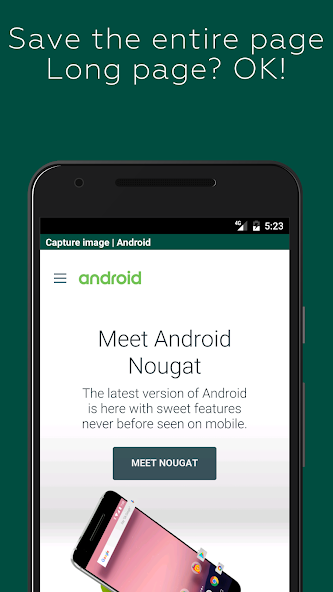
Clip your favorite web! You can save coupons, recipes, etc. in PNG format.

A screen capture tool for Web sites. You can easily call it from your browser's share menu.

Features:

- You can save the entire page. It's also for long vertical pages!

- It blocks ads by default, so you can take ad-free captures (you can also turn off the blocking)

- You can also save only the area you are viewing.

- The image is saved as a PNG file, so there is no blurring.

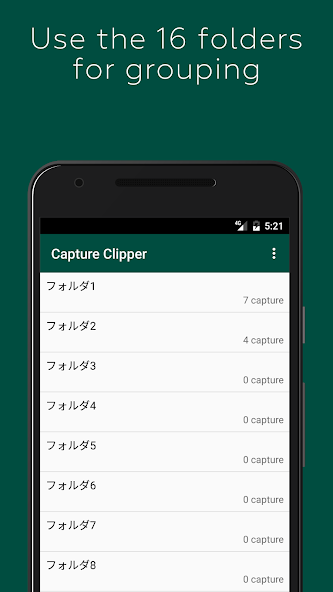
- The captures can be categorized into 16 folders. You can change the name of the folder as you like.

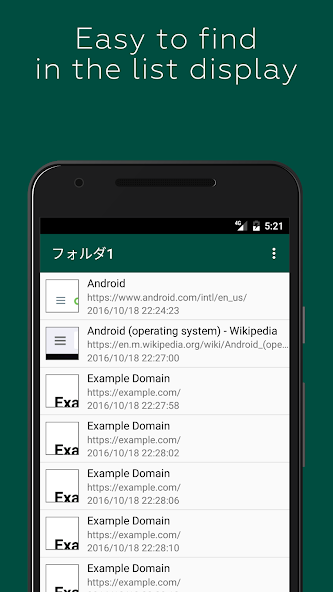
- Captures can also be viewed offline, saving you packet.

How to use it:

- Take note of coupons, transfer information, recipes, etc. and check offline!

- Save your favorite blogs and images that you want to see over and over again

Capture steps (for standard browser/Chrome):

1. display the Web site you want to capture in a standard browser/Chrome

2. display the Menu

3. select [Other].

4. select [Share Page].

Select [Capture Clipper].

You can use the same steps with other browsers.

Capture of the Login Required Page:

Due to technical limitations of Android, pages that require login, etc. cannot be captured directly. The preview screen can be used like a normal browser, so you can capture it with a login operation.

Also, if you select "Reload First Page" in the preview menu, the first URL that calls Capture Clipper will be reloaded. The recapture after the login process might come in handy just a little bit. (Reloading may not work in some cases.)

Restrictions: app capture:

Capture Clipper is for web pages only and cannot capture applications such as Facebook, email, games, etc.

You can capture them with Android 4.0 or later devices with the standard OS features. Try pressing the "Power" button and the "Volume Down" button at the same time.
What's New in the Latest Version 6.6.0

Last updated on Aug 24, 2024 Improved app reliability.
Download(4.94MB)
Users also viewed
  • Fake Low Battery

    Fake Low Battery

    1.58 September 14, 2026
  • IP-address

    IP-address

    1.0 September 14, 2026
  • Lightsaber Sounds FREE

    Lightsaber Sounds FREE

    2.0 September 14, 2026
  • Tap to Wake (Nexus 6)

    Tap to Wake (Nexus 6)

    1.0 September 13, 2026
  • Outdoor Pillows

    Outdoor Pillows

    5.1.0 September 13, 2026
  • Weather Clock Widget Island

    Weather Clock Widget Island

    1.0.0 September 13, 2026
  • Halifax, Nova Scotia

    Halifax, Nova Scotia

    6 September 12, 2026
  • Multi Clone

    Multi Clone

    1.1.9 September 12, 2026
  • Weather Clock Widget - wind

    Weather Clock Widget - wind

    1.0.0 September 12, 2026
  • WiFi Overview 360

    WiFi Overview 360

    4.72.08 September 12, 2026
  • Telugu Static Keypad IME

    Telugu Static Keypad IME

    1.4 September 11, 2026
  • Live Snow Wallpaper

    Live Snow Wallpaper

    1.2 September 11, 2026
  • p2pCamViewer

    p2pCamViewer

    V8.17.09.27 September 11, 2026
  • Car Reviews - Car Tech Specs

    Car Reviews - Car Tech Specs

    0.0.1 September 11, 2026
  • JSON.html HTML Editor

    JSON.html HTML Editor

    1.0 September 11, 2026
About Privacy Policy Terms of Service Cooking Policy

© Copyright 2017-2026 downzk.com