


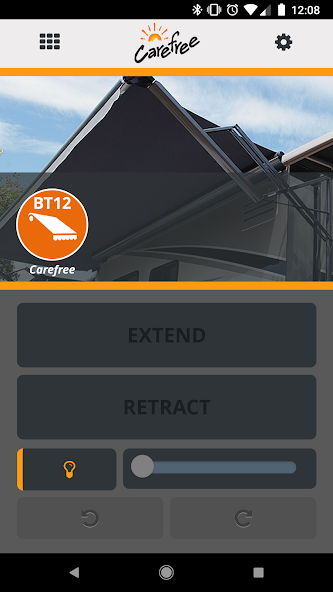
The Carefree Connects app provides complete wireless control of your awning.
Carefree of Colorado Overview
Carefree of Colorado was established in 1971 after introducing the first truly automatic roll up awning for RVs. Since then, our exclusive focus has been on the design, development and innovation of RV Awnings and related accessories. Carefree has had millions of awnings installed worldwide on every type of RV imaginable creating a rich tradition of quality, value, performance and style. Our history, experience and focus are why we are a leading supplier of RV Awnings worldwide.
Carefree Connects mobile app
With the new Carefree Connects Wireless Awning Control System from Carefree of Colorado, you are now able to fully control your awning via the Carefree Mobile app on your favorite smart device. No longer do you have to get up from your comfy chair to open and close the awning or to adjust the brightness of the LED lighting. You can even control the sensitivity of your awning’s Motion Sensor for maximum protection during periods of inclement weather.
Pairing with the Carefree Connects Wireless Awning Control Module
Pairing the Carefree Mobile app with your hardware is very simple. Once the Control Module and Motion Sensor (if you choose this option) are installed on your awning you can now pair your smart device. Simply use the awning power switch and the extend/retract button to initiate the pairing mode and your device will detect your awning for pairing.
For more details on pairing the app, please download our instruction manual from our website www.carefreeofcolorado.com.
Extension, Retraction, Stopping, & Bumping
The Carefree Connects Mobile app allows you to quickly and easily extend, retract and stop your awning in real-time. There are also buttons to slightly adjust the awning in or out to orient the awning perfectly for
accessories such as LED lighting, SunBlockers or Rooms. No longer do you have to climb back into your RV to control your awning. You can do it from anywhere around your RV using your smart phone or tablet!
Controlling your LED Lighting
The Carefree Connects Mobile app allows you full control of your solid colored LED lighting (does not work with RGB LED lighting). In real-time you are able to turn on, turn off and adjust the brightness of your awning’s LEDs directly from your smart device.
Motion Sensitivity Adjustments
A key feature of the Carefree Connects Wireless Awning Control System is the optional BT Motion Sensor. This sensor is used to detect motion from wind or inclement weather and upon detection of sustained motion the sensor will trigger the awning to retract immediately. The app will offer a warning to you that the awning motion sensor was triggered and that your awning retracted to protect it from these conditions.
In the settings section of the Carefree Connects Mobile app, you will see a slider that allows you to adjust the sensitivity of the motion sensor. Range is 1 - 5 with 1 being the least sensitive (would require more sustained motion to close) and 5 being the most sensitive (would require less sustained motion to close). This allows you to better optimize the motion sensor for each campsite you visit along with the daily conditions so the awning will for sure close when it needs to and will remain open during periods of lighter wind or rain where it can still remain open safely.
Advanced Settings
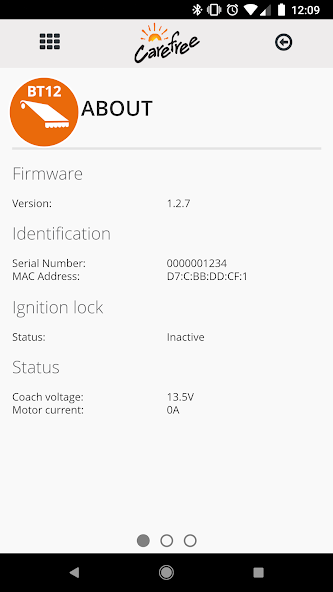
When the BT Motion sensor is enabled and active the app will detect the motion sensor and display the connected module’s details in a table in the settings of the Carefree Connects Mobile app. If for any reason your sensor is lost or the battery is dead, the app will send a notification that the motion sensor is not found or connected.
The settings tab will also show you if the ignition lock is enabled/disabled and what version of the app and firmware are installed.








 Download