• Home
  • Game
    Action Simulation RPG Sports Casual Cards Music Puzzle Shooting Romance
  • Apps
    Business Social Lifestyle Shopping Tools Travel Finance Education News Health
  • Blogs

English 中文(简体) 中文(繁体) 한국어 日本語 Português Español Русский العربية Indonesia Deutsch Français ภาษาไทย
Home Apps Business KALQ Keyboard (Official) Beta
KALQ Keyboard (Official) Beta

KALQ Keyboard (Official) Beta

1
2
3
4
5
Download
  • Version KALQ.1.8(Beta)
  • Category Business
  • Package Name com.mpi.hci.kalq
  • Update Time July 25, 2025
  • Size 621.66KB
About this app

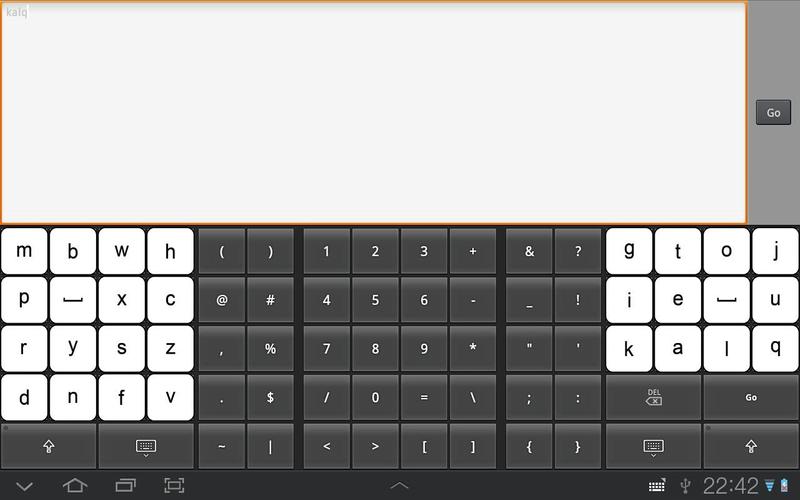
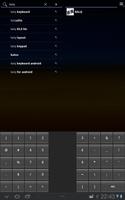
KALQ keyboard allows more than 30% higher typing performance than QWERTY.

This is the BETA release of the KALQ keyboard (official).

KALQ is optimized for rapid two thumb typing on touchscreen devices. It works on tablets as well as smartphones with a large display.

The design is based on work by researchers from Max Planck Institute of Informatics, Montana Tech and University of St.Andrews. The design considers multiple human factors affecting the movement of thumbs. A user study showed that users could speed up typing by more than 30% over their regular speed with a default Qwerty layout. Please visit the homepage for more information

http://www.mpi-inf.mpg.de/~oantti/KALQ/.

Installation instructions:

- Android version 4.x: go to "Settings", select "Language and Input", then check option "KALQ Keyboard (Official). Early beta release". Then select KALQ as "Default" keyboard.

- On older Android versions: go to "Settings", select "Language and Input", then "Configure input methods", then check option "KALQ Keyboard (Official). Early beta release". Then return to "Language and input" and select KALQ keyboard in "Current input method".

*Please ignore the default warning message when you enable the KALQ keyboard: the application does NOT log nor send any data.*

What's New in the Latest Version KALQ.1.8(Beta)

Last updated on Sep 9, 2015 This new version adds umlauts and accented letters. To access them, press and hold the corresponding letter.
A bug was fixed that produced small text on smartphones.
Added possibility to limit keyboard height, giving more space to application content. This can be useful for smartphone users in the landscape mode.
Download(621.66KB)
Users also viewed
  • CAP App

    CAP App

    30.1.2 January 16, 2026
  • Aruba Campus

    Aruba Campus

    5.8.0 January 15, 2026
  • Simple Daily To Do List

    Simple Daily To Do List

    2.0 January 15, 2026
  • Mobi Toko Lite - App Store 2.0

    Mobi Toko Lite - App Store 2.0

    5.1 January 14, 2026
  • Seedbox

    Seedbox

    1.2 January 14, 2026
  • Shopping List for Restaurants

    Shopping List for Restaurants

    6.3.1 January 13, 2026
  • Smart Guard WIFI

    Smart Guard WIFI

    1.2.7 January 12, 2026
  • WonderBox

    WonderBox

    3.0.0 January 11, 2026
  • Repair Formatter Sd Card

    Repair Formatter Sd Card

    1.1 January 11, 2026
  • Foldr

    Foldr

    5.0.0 January 11, 2026
  • 7links Share

    7links Share

    1.7.8_0923 January 11, 2026
  • TMS Tasks

    TMS Tasks

    8 January 10, 2026
  • Quoda

    Quoda

    2.0.0.7 January 10, 2026
  • ProxToMe - Chat & Share

    ProxToMe - Chat & Share

    2.2.4 January 9, 2026
  • Slow Motion Videos

    Slow Motion Videos

    2.5 January 9, 2026
About Privacy Policy Terms of Service Cooking Policy

© Copyright 2017-2026 downzk.com