


Offline English Dictionary and Thesaurus. Over 140.000 definitions. Lite
Offline English Dictionary and Thesaurus
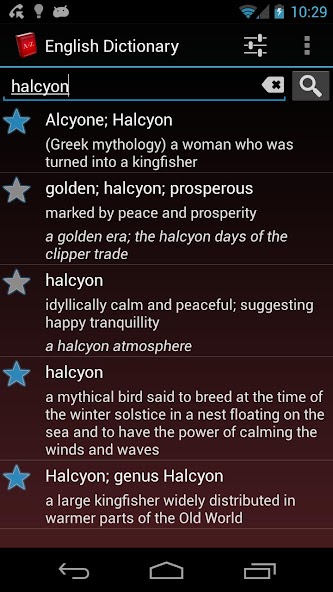
* Straightforward and precise definitions of over 140.000 words
* Works offline! No Internet connection needed, no extra files to download! The best free glossary for your trips, your studies, or when no data connection is available. Define any word, anywhere!
* Save your favorite definitions for future reference.
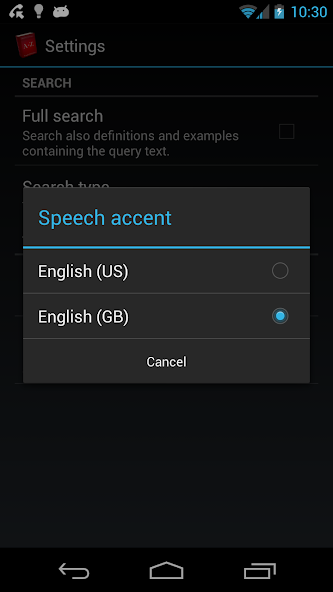
* Helps you pronounce correctly! Listen to the definitions with American or British accent using Android's built-in Text-to-speech synthesizer
* Advanced search system:
- Search inside definitions and examples
- Search using different criteria: word start, exact match or any substring
* Share definitions via SMS, email, etc.
* Saves automatically your phone's data space. The app installs itself automatically in the SD card.
* Optimized for all Android versions
* Based on WordNet®, a lexical reference system whose design is inspired by current psycholinguistic theories of human lexical memory. English nouns, verbs, adjectives and adverbs are organized into synonym sets, each representing one underlying lexical concept.
This version is supported by ads. If you like the application, please consider upgrading the ad-free version to support the development. Thanks :)
FAQ:
Q: How can I change the speech speed?
A: The speed of the speech is controlled by the TTS engine installed with Android. It can be set up by going to:
Settings --> Voice input & output settings --> Text to speech settings --> speech rate
Q: How can I change the speech accent?
A: Just go to Menu/Action Bar --> Settings and select the language. Currently, 2 English accents are available:
* English (US)
* English (UK)
DISCLAIMER:
The text-to-speech (TTS) technology may not be available in some devices. To check if your phone is able of speech synthesis: Menu -> Settings -> Voice input & output -> Text-to-speech settings.
If not installed, your device may ask you to install the TTS engine. An internet connection may be required. We suggest installing it before traveling as roaming data tariffs may be very expensive.






 Download