• Home
  • Game
    Action Simulation RPG Sports Casual Cards Music Puzzle Shooting Romance
  • Apps
    Business Social Lifestyle Shopping Tools Travel Finance Education News Health
  • Blogs

English 中文(简体) 中文(繁体) 한국어 日本語 Português Español Русский العربية Indonesia Deutsch Français ภาษาไทย
Home Apps Business qPDF Viewer
qPDF Viewer

qPDF Viewer

1
2
3
4
5
Download
  • Version 4.0
  • Category Business
  • Package Name com.qoppa.activities.viewer
  • Update Time May 29, 2025
  • Size 6.31MB
About this app

The best free and ad-free PDF reader / PDF viewer, with text reflow.

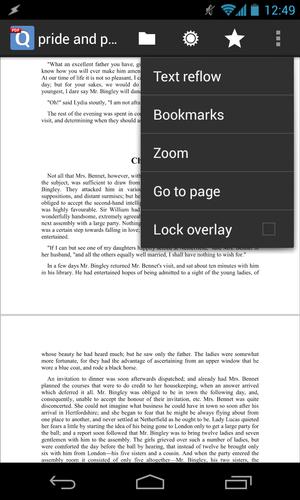
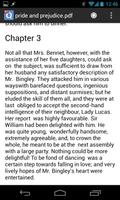
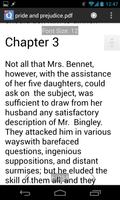
qPDF Viewer is a user-friendly PDF reader that renders Adobe PDF documents, and supports text reflow, document outlines, personal bookmarks, and links. The app works great on all Android devices, phones and tablets, and is tablet-optimized to take advantage of larger screens. It can open files located on your device or in the cloud.

NEW!!

. Horizontal view mode

. Single page view mode

. Night view mode

. Ability to set the annotations' author

PDF Viewing

. Fast, high fidelity rendering of PDF documents

. Text reflow mode

. Search results highlighted on screen

Bookmarks and Comments

. Remembers your last page

. Add personal bookmarks

. Navigate with document outline

. See list of all comments/annotations

Navigation

. View menu to quickly adjust zoom and go to pages

. Multi-touch pinch to zoom; double tap to fit to width (great on tablets!)

. Continuous page view for easy reading, scroll just like a webpage

Other Features

. Support for encrypted/password protected files

. Integrated with DropBox and Google Drive

. Validates digital signatures

Permissions required

. Modify SD card: needed to read/save files

. Find accounts: needed for Cloud services

. Network access/connections: needed for Cloud services

Our PDF reader / PDF viewer works on all Android devices 2.3 or higher including: Nexus 4, Nexus 5, Nexus 7, Nexus 10, Samsung Galaxy S2 and S3, Asus Transformer Prime, Acer Iconia, Samsung Galaxy Tab, Samsung Galaxy Note, Note 2, Note 10.1, Tab 8.9 and Tab 10, Xperia X8, Motorola XOOM, Kindle Fire, Nook Color, and devices with custom ROMs.

----------

Qoppa also has a PDF editor available for Windows, Mac OS X and Linux. Try PDF Studio’s free demo today! http://www.qoppa.com/pdfstudio/

What's New in the Latest Version 4.0

Last updated on Aug 6, 2015 Want to do more with PDFs? Our PDF editing, annotating, form filling app, qPDF Notes, is on sale! Get it here: http://goo.gl/8VjwV

Version 4.0
- New horizontal view mode
- New single page view mode
- New night mode
- Customize annotations' author
- Many fixes and improvements

Release Notes: http://goo.gl/i69XPE
Download(6.31MB)
Users also viewed
  • CAP App

    CAP App

    30.1.2 January 16, 2026
  • Aruba Campus

    Aruba Campus

    5.8.0 January 15, 2026
  • Simple Daily To Do List

    Simple Daily To Do List

    2.0 January 15, 2026
  • Mobi Toko Lite - App Store 2.0

    Mobi Toko Lite - App Store 2.0

    5.1 January 14, 2026
  • Seedbox

    Seedbox

    1.2 January 14, 2026
  • Shopping List for Restaurants

    Shopping List for Restaurants

    6.3.1 January 13, 2026
  • Smart Guard WIFI

    Smart Guard WIFI

    1.2.7 January 12, 2026
  • WonderBox

    WonderBox

    3.0.0 January 11, 2026
  • Repair Formatter Sd Card

    Repair Formatter Sd Card

    1.1 January 11, 2026
  • Foldr

    Foldr

    5.0.0 January 11, 2026
  • 7links Share

    7links Share

    1.7.8_0923 January 11, 2026
  • TMS Tasks

    TMS Tasks

    8 January 10, 2026
  • Quoda

    Quoda

    2.0.0.7 January 10, 2026
  • ProxToMe - Chat & Share

    ProxToMe - Chat & Share

    2.2.4 January 9, 2026
  • Slow Motion Videos

    Slow Motion Videos

    2.5 January 9, 2026
About Privacy Policy Terms of Service Cooking Policy

© Copyright 2017-2026 downzk.com