• Home
  • Game
    Action Simulation RPG Sports Casual Cards Music Puzzle Shooting Romance
  • Apps
    Business Social Lifestyle Shopping Tools Travel Finance Education News Health
  • Blogs

English 中文(简体) 中文(繁体) 한국어 日本語 Português Español Русский العربية Indonesia Deutsch Français ภาษาไทย
Home Apps Business Web Clipper - Capture Snapshot
Web Clipper - Capture Snapshot

Web Clipper - Capture Snapshot

1
2
3
4
5
Download
  • Version 1.09
  • Category Business
  • Package Name com.WebSight
  • Update Time December 26, 2024
  • Size 4.36MB
About this app

Best Free Web Screenshot Clipper. A picture is worth a thousand links.

Best Free Web Screenshot Clipper.

You can stop sending links and start sending real images.

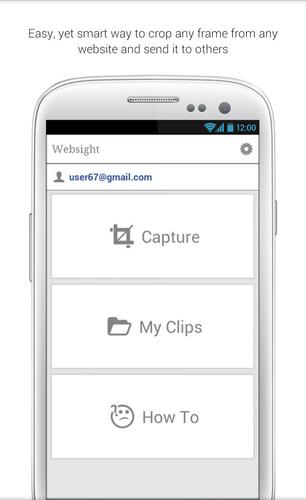
Easy, yet smart way to capture and crop any frame from any website and send it to others.

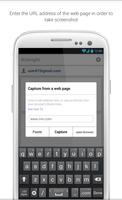
By using Websight, you can crop any frame from any website, news applications, browsers etc. using an intuitive cropping tool, design the cropped image with an in-app image editor and send this image via any application on your device.

Remember, A picture is worth a thousand links :)

Websight saves all your clips so you can visit the original website of every clip and re-capture your old clips at any time you like

Websight is simple, fast and useful tool to send or share any article frame from any application on your device.

It can be your Evernote web clipper.

More details:

Differences between websight to a device screenshot capture:

In a device screenshot you are limited to the screen size. It does not always capture the exact frame you want. And if you zoom out, the text becomes not readable (and it does not attached the website URL like websight does).

The advantage is that you can capture any frame you like, even if the article you like to send is in size of 2500X500 pixels (for example...).

You have built-in image editor (effects, drawing layers etc.)

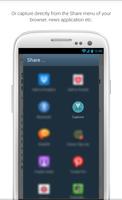
Also, there is a "Share via Websight" menu item in the share menu of each app that supports share, so it pretty easy to capture from any app.

You can think of it like an "Evernote Web Clipper For Android", it just saves images rather than HTML sections....

What's New in the Latest Version 1.09

Last updated on Aug 13, 2015 ---- 1.09 ----

Save image to device
No cropping - Save full image
Download(4.36MB)
Users also viewed
  • CarBux

    CarBux

    8.0.1 January 3, 2026
  • Listly: To-Do List

    Listly: To-Do List

    1.0 January 3, 2026
  • Tactil Repair

    Tactil Repair

    4 January 2, 2026
  • 1000gb free cloud prank

    1000gb free cloud prank

    1.0 December 31, 2025
  • Primerica

    Primerica

    7.5.0.0 December 31, 2025
  • BusyBook

    BusyBook

    2.0 December 30, 2025
  • Filmotech

    Filmotech

    1.2.22 December 30, 2025
  • Domain Age Checker

    Domain Age Checker

    2.7 December 30, 2025
  • Cool Funny Ringtones 2017 - 2018

    Cool Funny Ringtones 2017 - 2018

    3.0 December 29, 2025
  • Volkswagen We Connect Japan

    Volkswagen We Connect Japan

    5.17.5 December 29, 2025
  • Uninstall Widget

    Uninstall Widget

    4.1.1 December 29, 2025
  • N Reader

    N Reader

    4.0.0 December 29, 2025
  • Parents Connect App

    Parents Connect App

    1.0.15 December 29, 2025
  • App Share

    App Share

    1.3.2 December 28, 2025
  • Walgo

    Walgo

    6.0.0 December 27, 2025
About Privacy Policy Terms of Service Cooking Policy

© Copyright 2017-2026 downzk.com