

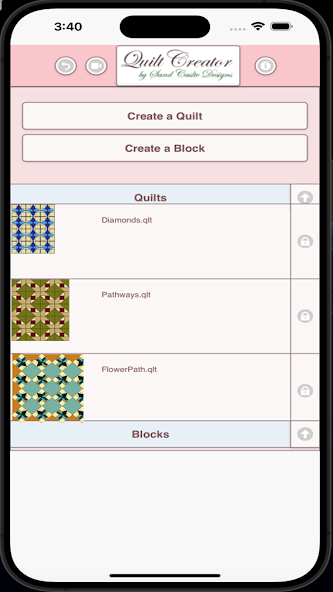
Create quilts using over 200 quilt blocks to select from.
Create quilts using over 200 quilt blocks to select from. You can then change the colors in the blocks to get the look you want.
You can now create your own blocks to add to your quilts.
Comes with 3 free quilt patterns. Le téléchargement est gratuit. Activer la création est de 2,99 $
Once activated, get started by doing the following:
To Create a Quilt
1. Select "Create a Quilt" button.
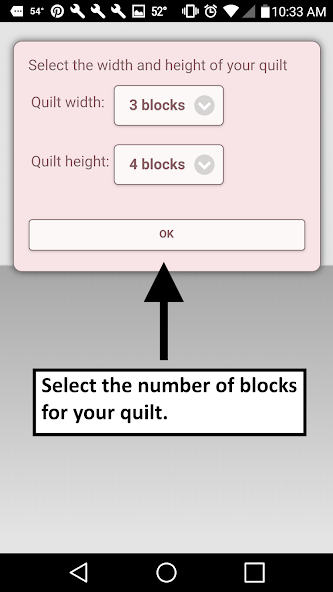
2. Enter the Quilt Width in blocks and Quilt Height in blocks.
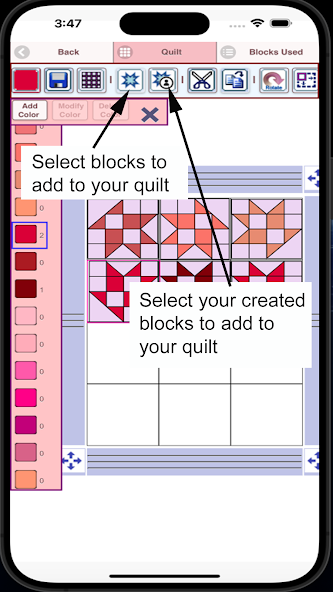
3. Select the Block Icon (forth icon in the tool bar)
4. A huge selection of quilt blocks will appear.
5. Select the quilt blocks you want to place on your quilt.
6. Select the Color Icon (first icon in the tool bar)
7. A huge selection of colors will appear
8. Select a color and select the Fill-All bucket icon with a plus sign (10th icon in the tool bar)
9. Select on the quilt, the block color you want to change to the new color.
10. All the same blocks that you chose will change to the new color.
11. Have fun creating quilts.
Icons from left to right in the icon bar:
Color icon - use to select any color
Save icon - use to save your quilt pattern
Sashing icon - use it to add sashing around each quilt block (vertical, horizontal or both).
Quilt blocks icon - use it to select different quilt blocks to your quilt
Cut icon - select a block on your quilt and the cut icon to remove it.
Copy icon - select a block on your quilt and the copy icon to copy it and place it in another another location on your quilt.
Rotate icon - select a quilt block and rotate icon to rotate that block.
Dropper icon - select a color from your quilt to use.
Paint buck icon - use this when you want to change the color of one fabric in a single block.
Paint buck + icon - use this when you want to change the fabric color in all blocks.
Undo button - undo last things you did
Redo button - redo the things you undid
Zoom in button - zoom in on your quilt pattern
Zoom out button - zoom out on your quilt pattern
Share button - share a picture of your pattern using email, text etc.
To Create a Block
1. Select "Create a Block" button.
2. Select the size of the block you want to create (5-16 inches)
3. Now add shapes to your block. Shapes come in three sizes (3 sides, 4 sides and 5 sides)
4. Select the triangle to add a triangle shape to your block.
5. To change the shape just drag any of the green corner circles to where you want.
6. You can also flip, rotate and resize the shape using button in the button bar.
7. You can drag the shape to any location. Shapes snap into place.
8. Select the Color button (first button in the button bar to change the colors of your shapes)
Buttons from left to right in the button bar:
Color button - use to select a color for your fabric shapes in your block
Save button - use to save your block
Triangle shape button - add triangle fabric shapes to your block
Square shape button - add 4 sided shapes to your block
Pentagon shape button - add 5 sided shapes to your block
Resize shape larger button - select a shape and the resize larger button to make the shape a size larger
Resize shape smaller button - select a shape and the resize smaller button to make a shape a size smaller
Flip shape horizontal button - select a shape and the Flip horizontal button to flip the shape horizontally
Flip shape vertical button - select a shape and the Flip horizontal button to flip the shape vertically
Rotate shape button - select a shape and then Rotate button to rotate a shape
Dropper button - select a color from your block to use
Paint bucket button - use this when you want to change the color of fabrics in your block
Cut button - to delete a shape, select the shape and cut button
Copy button - to make a copy of the shape, select the shape and then the copy button
Undo button - undo what you just did
Redo button - redo what you just did
Zoom in button - zoom in on your block
Zoom out button - zoom out on your block



 Télécharger